Apple is on a spree of launching new devices. It recently introduced the iPhone 17e alongside a brand-new iPad Air powered by the latest M4 chip. Now, it has also launched its most affordable MacBook yet, the MacBook Neo. With a starting price of ₹69,900 for the 256GB model, the MacBook Neo enters a price segment that has so far been dominated largely by Windows laptops.
In addition to the MacBook Neo, Apple has also upgraded its popular former “budget” laptop, the MacBook Air, with the M5 chip, double the storage, several other improvements under the hood and an updated and increased price tag of ₹1,19,900.
With the arrival of these two new MacBooks, the choice has become slightly more complicated. Both are 13-inch laptops and both feature a fanless design. So the question is simple: which MacBook should you choose between the two? Here’s the answer.
MacBook Neo vs MacBook Air M5: Design and Build Quality
The MacBook Air 13-inch (M5) and MacBook Neo (A18 Pro) are very close in portability, but there are a few small differences worth noting.
Even though the MacBook Neo has a slightly smaller overall chassis, the MacBook Air is still the thinnest laptop in the lineup, measuring 1.13 cm, while the MacBook Neo measures 1.27 cm.
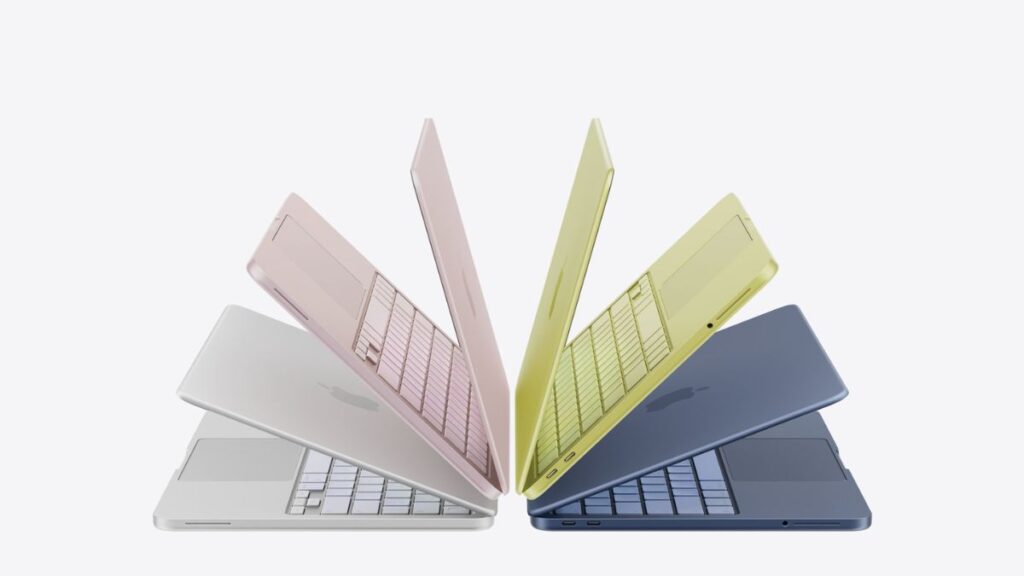
However, the MacBook Neo has a slightly smaller footprint overall. Its width is 29.75 cm, compared to 30.41 cm on the Air, and its depth is 20.64 cm, compared to 21.5 cm on the Air. In practical terms, the Neo may feel slightly more compact on a desk. And when it comes to weight, both laptops are identical at 1.23 kg.

In terms of build quality, both laptops use an aluminium unibody-style enclosure, which is the standard design Apple uses across its MacBook lineup. As a result, one can reasonably expect similar levels of keyboard and chassis flex, which, in the case of recent MacBooks, has been very well managed.
So the MacBook Air and the MacBook Neo will feel almost the same whether in your backpack or on your lap, considering their similar overall size, weight, and build material.
MacBook Neo vs MacBook Air M5: Keyboard, Touchpad and I/O
Both the MacBook Air (M5) and the MacBook Neo use Apple’s Magic Keyboard layout with 78 (ANSI) or 79 (ISO) keys, including 12 full-height function keys. This means the typing layout and key spacing are essentially identical, so users moving between the two should not notice any difference in day-to-day typing comfort.
However, the MacBook Air offers a slightly more complete keyboard setup. It includes Touch ID on all configurations and also features an ambient light sensor, which allows the keyboard backlight to adjust automatically depending on lighting conditions. This makes the keyboard a bit more convenient to use in changing environments.

On the MacBook Neo, Touch ID is only available on the 512GB model, meaning the base variant does not include fingerprint authentication. The Neo also does not list an ambient light sensor, suggesting the keyboard backlight may require manual adjustment.
The trackpad experience is where a more noticeable difference appears between the two laptops.
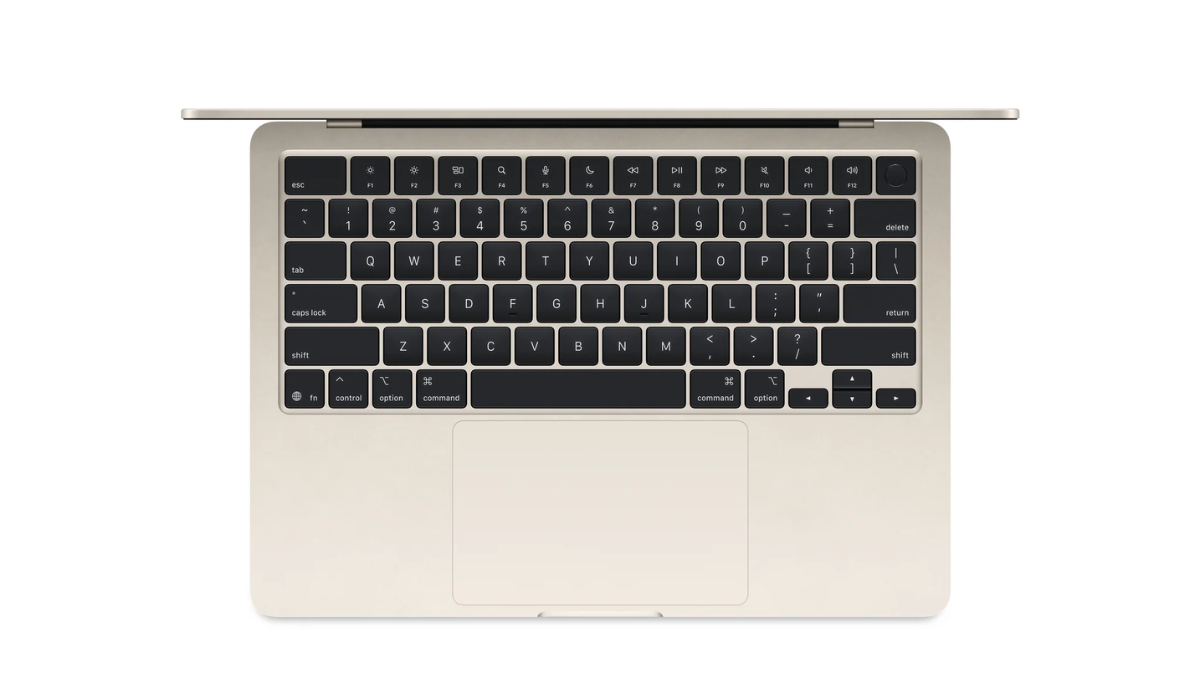
The MacBook Air (M5) uses Apple’s Force Touch trackpad, which supports pressure-sensitive input. This allows features such as Force Click, pressure-sensitive drawing, accelerators, and deeper interaction with macOS controls. Instead of physically clicking, the trackpad uses Apple’s haptic engine to simulate a click, which makes the surface feel consistent no matter where you press. This system has been a hallmark of MacBooks for years and is widely regarded as one of the best trackpads on any laptop.
The MacBook Neo, on the other hand, uses a standard Multi-Touch trackpad. It still supports common macOS gestures such as pinch-to-zoom, two-finger scrolling, and multi-finger navigation. However, it does not include the pressure-sensitive Force Touch mechanism found on the Air.
The port selection is one area where the MacBook Air clearly has the advantage, even though both laptops offer two USB-C ports.

The MacBook Air (M5) features two Thunderbolt 4 USB-C ports, each capable of up to 40Gbps bandwidth. Thunderbolt 4 supports significantly higher data transfer speeds and enables a wider range of functionality. These ports can handle high-speed storage, external displays, charging, and advanced accessories such as Thunderbolt docks and external SSDs. This makes the Air more flexible if you plan to connect multiple peripherals or high-performance external devices.
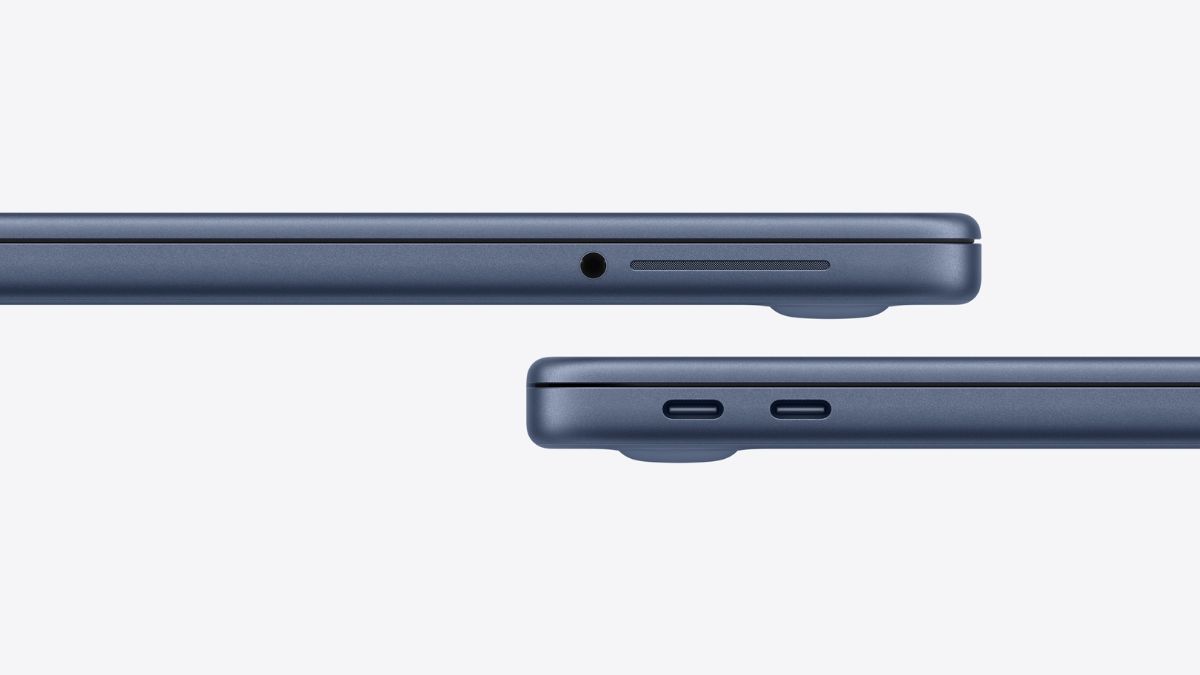
The MacBook Neo, in comparison, includes one USB 3 USB-C port and one USB 2 USB-C port. The USB 3 port supports up to 5Gbps data transfer speeds, while the USB 2 port is limited to 480Mbps. While both ports still use the USB-C connector and support charging and basic connectivity, they offer significantly lower data transfer speeds and fewer advanced capabilities compared to Thunderbolt. This suggests the Neo is designed primarily for simpler workflows such as charging, basic accessories, and occasional file transfers.
In practical use, both laptops may look similar with their two USB-C ports, but the MacBook Air offers significantly more capability thanks to Thunderbolt 4 support.
MacBook Neo vs MacBook Air M5: Performance
The MacBook Air comes with Apple’s latest M5 chip, which features a 10-core CPU and an 8-core GPU. In comparison, the MacBook Neo is powered by the A18 Pro Bionic chip, which includes a 6-core CPU and a 5-core GPU. This appears to be a binned version of the chip, as the A18 Pro in the iPhone 16 Pro Max features a 6-core GPU.

Just like the M5, the A18 Pro also includes hardware-accelerated ray tracing and a 16-core Neural Engine. However, its memory bandwidth is limited to 60GB/s, which is significantly lower than the 153GB/s memory bandwidth available on the M5.

In terms of chip configurations, Apple has used similar binning strategies in other devices as well. For instance, the latest iPad mini with the A17 Pro features a 6-core CPU and a 5-core GPU, whereas the iPhone 15 Pro series uses the same A17 Pro chip with a 6-core GPU.
Because both of these chips have already been used in several devices beforehand, we have some idea of what their performance might look like in the MacBook Air and MacBook Neo.
Note: All benchmark figures referenced in this section are sourced from publicly available data compiled by Nanoreview. The results include the Apple M5, Apple A18 Pro, and comparison processors from Intel and AMD. These figures are used for informational comparison only and do not represent direct testing conducted as part of this review. All trademarks and benchmark results belong to their respective owners and are reproduced under fair use for editorial analysis.
To simulate the performance of the MacBook Air (M5), we are using the performance figures of the iPad Pro (M5), as it is also a 13-inch fanless device. To simulate the performance of the MacBook Neo (A18 Pro), we are using the performance figures of the iPhone 16 Pro Max, as at the time of writing no other iPad or fanless Apple device is available with the same chip.
In some benchmarks, we will also compare these ARM chips with a few entry/mid tier x86 chips from Intel and AMD.
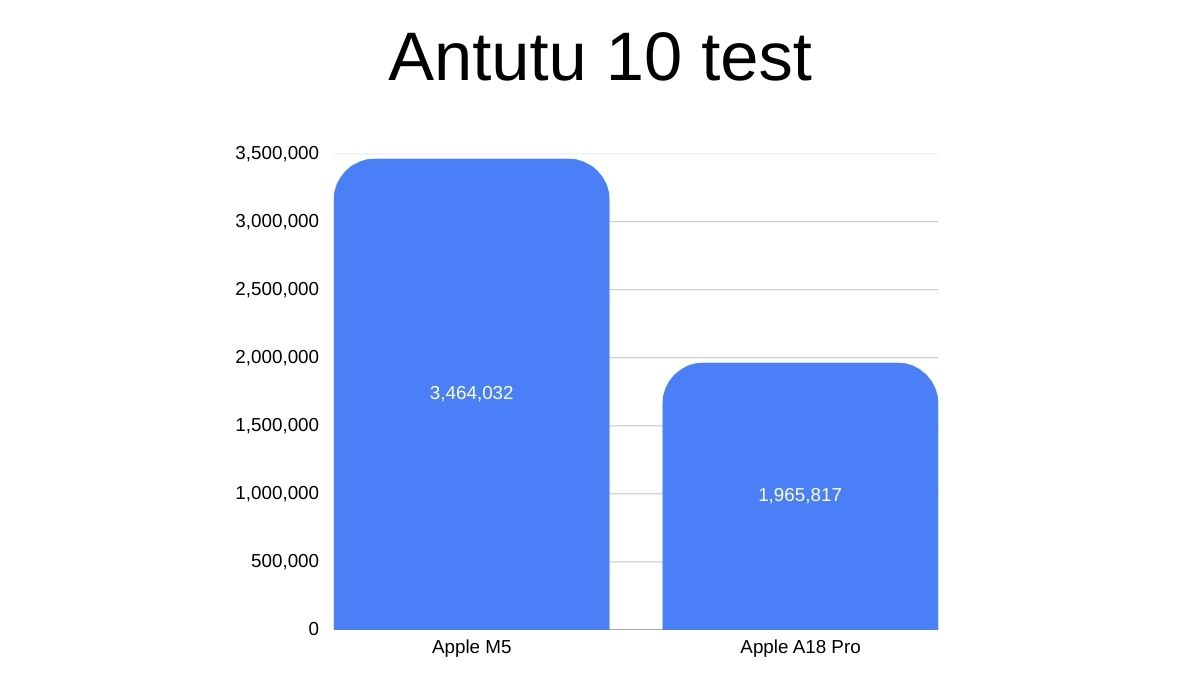
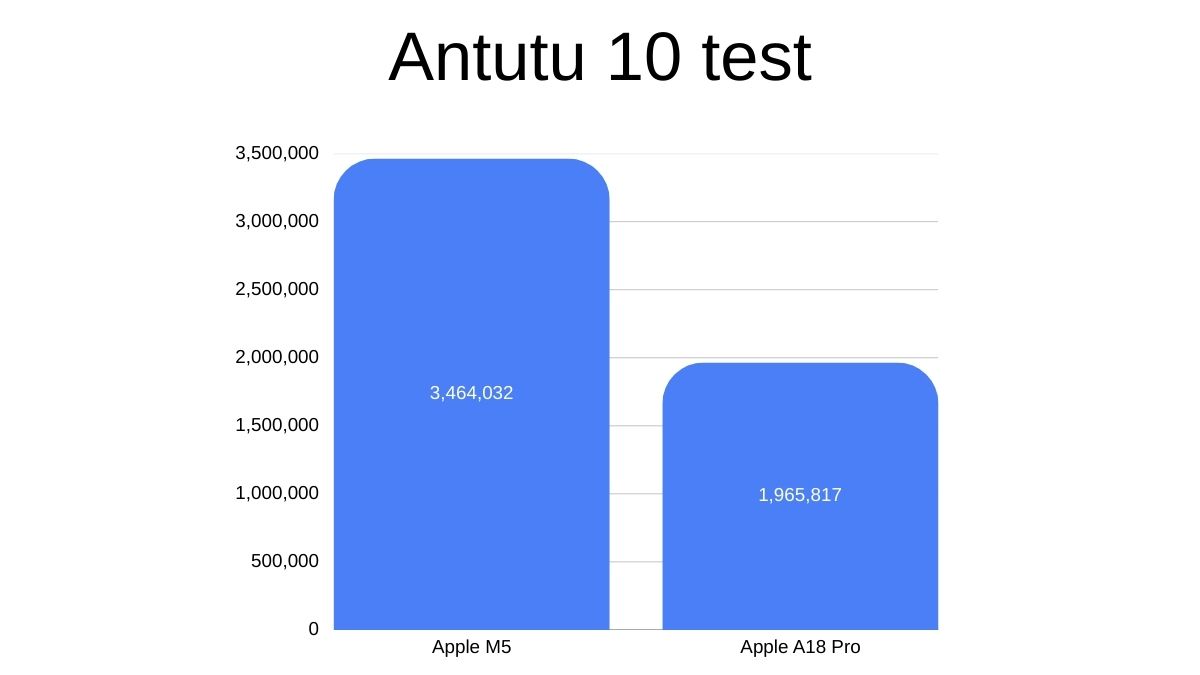
Starting with AnTuTu 10, which tests everything from graphics to memory speed, the M5 chip scored 3,464,087, while the A18 Pro scored 1,965,789, which represents roughly a 75% difference in score.
Meanwhile, in Geekbench 6, the M5 chip scored 4,125 in single-core and 15,565 in multi-core tests, while the A18 Pro scored 3,587 in single-core and 9,086 in multi-core tests. For comparison, the M3 chip scores 3,009 in single-core and 15,476 in multi-core tests.
For additional context, the Intel Core Ultra 7 155H scores 2,421 in single-core and 12,515 in multi-core tests in Geekbench 6. Meanwhile, the AMD Ryzen AI HX 370 scores 2,985 in single-core and 15,976 in multi-core tests.
As you can see from the graph above, both the Apple M5 and the A18 Pro lead in terms of single-core performance by a significant margin. Single-core performance is most noticeable in everyday tasks such as opening or closing apps, launching programs, web browsing, navigating the operating system, and handling light productivity workloads.
However, the lower multi-core performance of the A18 Pro could become noticeable in heavier productivity tasks such as video editing, batch photo processing, and complex graphic workloads.
Therefore, the signature snappy performance for which Apple’s M-series silicon is known is also likely to be present in the A18 Pro-powered MacBook Neo.
MacBook Neo vs MacBook Air M5: Display and Speakers
The displays on the MacBook Air (M5) and the MacBook Neo share some similarities, but there are a few important differences in size, resolution, and color support.
The MacBook Air (M5) features a 13.6-inch Liquid Retina display with a resolution of 2560 × 1664 pixels. The slightly larger panel provides a bit more screen real estate compared to the Neo. It also supports wide colour (P3) and True Tone technology, which allows the display to adjust its white balance based on ambient lighting conditions. These features help deliver more accurate colours and a more comfortable viewing experience during extended use.

The MacBook Neo, on the other hand, comes with a 13-inch Liquid Retina display with a resolution of 2408 × 1506 pixels. While the display is slightly smaller and has a lower resolution, it still maintains Apple’s Retina-level pixel density, meaning text and interface elements should remain sharp in everyday use.
Both displays offer 500 nits of brightness, so outdoor visibility and general brightness levels should be similar between the two laptops. However, the Neo is limited to sRGB colour, while the Air supports the wider P3 colour gamut, giving the Air an advantage for tasks that benefit from richer and more accurate colours, such as photo editing or content creation.
The audio setup on the two laptops is similar in terms of features, but the MacBook Air clearly offers the more capable hardware.

The MacBook Air (M5) comes with a four-speaker sound system, while the MacBook Neo features a dual-speaker setup. In practical use, this likely means the Air can deliver louder output, better stereo separation, and fuller sound, particularly when watching movies or listening to music.
Both laptops support Spatial Audio when playing music or video with Dolby Atmos on the built-in speakers. They also support Spatial Audio with dynamic head tracking when paired with compatible AirPods models such as AirPods, AirPods Pro, and AirPods Max. This means users will get a similar immersive audio experience when using Apple’s wireless headphones.
There are also differences in the microphone systems. The MacBook Air features a three-microphone array with directional beamforming, while the MacBook Neo uses a dual-microphone array. Both systems support Voice Isolation and Wide Spectrum microphone modes, which help improve voice clarity during video calls and recordings. However, the additional microphone on the Air may provide slightly better voice pickup and noise handling.
Both laptops include a 3.5 mm headphone jack, but the MacBook Air adds advanced support for high-impedance headphones, which can be useful for users with professional or studio-grade audio equipment.
MacBook Neo vs MacBook Air M5: Webcam
The camera setup on the two laptops is fairly similar in terms of core functionality, but the MacBook Air offers a more advanced system.
The MacBook Air (M5) features a 12MP Center Stage camera. Center Stage uses intelligent cropping and tracking to keep you centered in the frame during video calls as you move. The camera also supports Desk View, which allows the system to simultaneously show your face and a top-down view of your desk, a useful feature for presentations, demonstrations, or online classes. Like the Neo, it supports 1080p HD video recording and uses an advanced image processing to improve clarity and exposure.
The MacBook Neo, on the other hand, comes with a 1080p FaceTime HD camera. It still supports 1080p video recording and includes an advanced image signal processor with computational video, which should help maintain decent image quality in video calls.
However, it lacks the higher-resolution sensor and features such as Center Stage and Desk View.
MacBook Neo vs MacBook Air M5: Battery Size and Backup
The MacBook Air (M5) packs a much larger 53.8Wh battery and is rated for up to 18 hours of video playback, while the MacBook Neo uses a smaller 36.5Wh battery and is rated for up to 16 hours. Despite the smaller battery, Apple claims only two hours less battery life for the MacBook Neo, which also hints that the A18 Pro chip could be highly efficient in a 13-inch chassis.
MacBook Neo vs MacBook Air M5: Which one is right for you
The answer largely depends on how you plan to use your laptop and how much you are willing to spend.At ₹69,900, the MacBook Neo represents Apple’s most affordable entry into the MacBook ecosystem so far. For users who primarily need a laptop for everyday tasks such as web browsing, watching videos, writing documents, attending online classes, and light productivity work, the Neo should be more than capable. The A18 Pro chip still offers strong single-core performance, which means the laptop is likely to feel responsive in daily use. And with 16 hours of claimed battery life, you can reasonably expect it to last through a full day of light work without needing to reach for the charger.

However, there are clear trade-offs that come with the lower price. The MacBook Neo offers slower USB ports, a simpler trackpad, a dual-speaker setup, a more basic webcam, and lower multi-core performance. These limitations may become noticeable if you plan to connect high-speed accessories, work with external displays, edit large media files, or run heavier creative workloads.
The MacBook Air with the M5 chip, on the other hand, remains the more capable laptop overall. Its faster M5 processor, significantly higher memory bandwidth, Thunderbolt 4 connectivity, Force Touch trackpad, better speakers, slightly longer battery life, and more advanced webcam make it a more complete machine for demanding users. The Air is better suited for tasks such as video editing, graphic design, heavier multitasking, and professional workflows.
That said, the MacBook Air also costs nearly ₹50,000 more, which is a substantial difference.
In simple terms, the MacBook Neo is the best entry point into the MacBook lineup, while the MacBook Air M5 is the better choice for users who need more power, better connectivity, and a more feature-complete laptop.