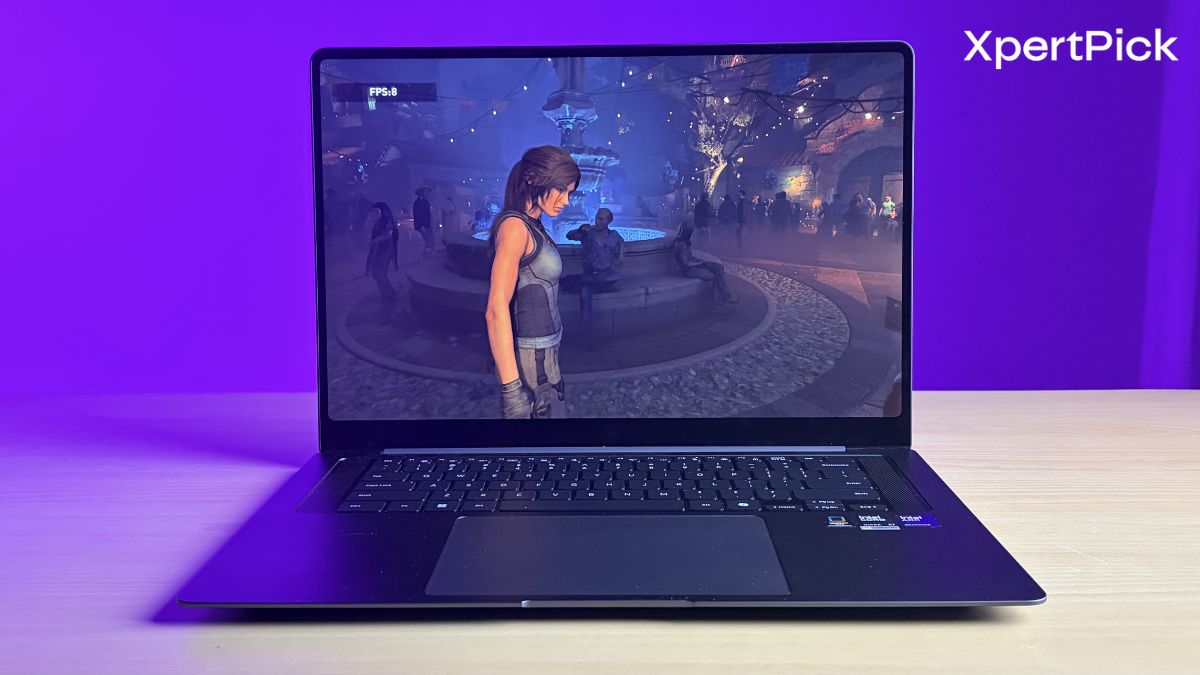
The Samsung Galaxy Book6 Pro has been with us for quite some time, and we have put it through the wringer. We also explored some of its unique yet understated features, and how they can seriously improve day-to-day productivity.
The Intel Panther Lake chip inside the laptop, more specifically the Intel Core Ultra X7 358H, performed exceptionally well in our tests, largely thanks to the new Intel Arc B390 iGPU. This effectively gives the laptop a processor package capable of delivering strong single-core and multi-core performance, along with graphics performance comparable to an Nvidia GeForce RTX 4050. Impressively, it manages this while consuming around 50W, whereas a traditional CPU and dedicated GPU combination would typically draw between 100W and 150W.
This is why this gaming test will put the Samsung Galaxy Book6 Pro through a comprehensive suite of modern and legacy AAA titles. By pushing the machine across a variety of demanding game engines at a native 1200p resolution, we want to see exactly how well this highly efficient Panther Lake package handles complex rendering, sustained thermal loads, and frame pacing in real-world scenarios.
Thermal Performance: Surface and Internal Temperatures Under Load
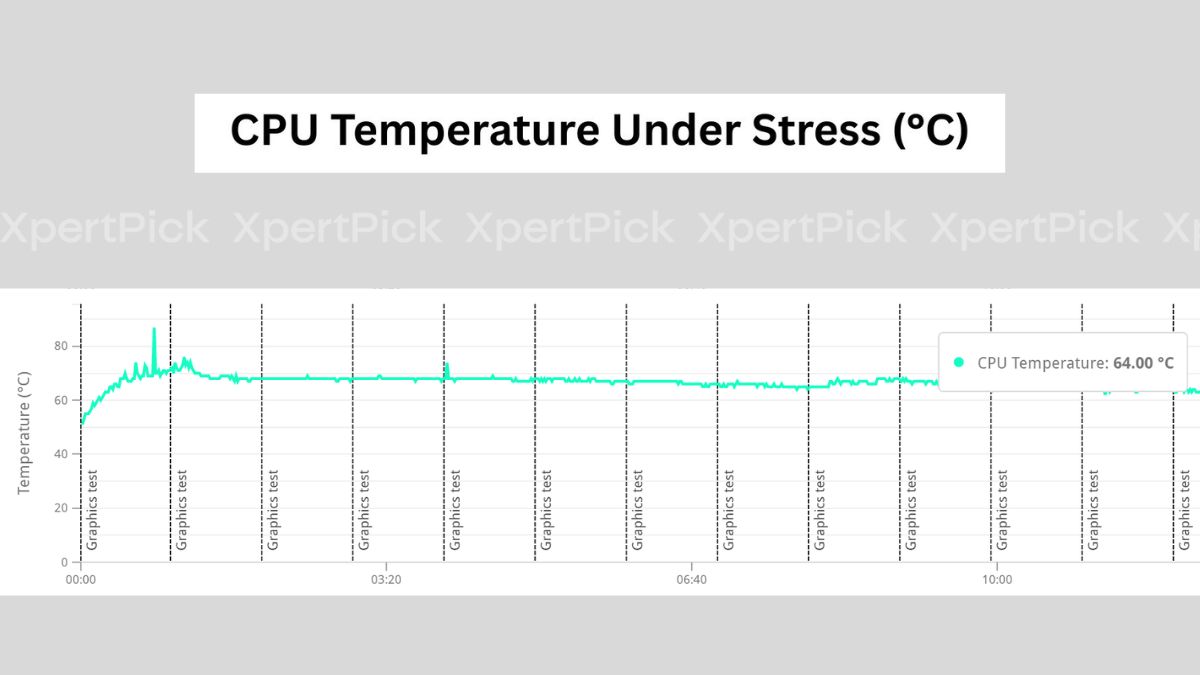
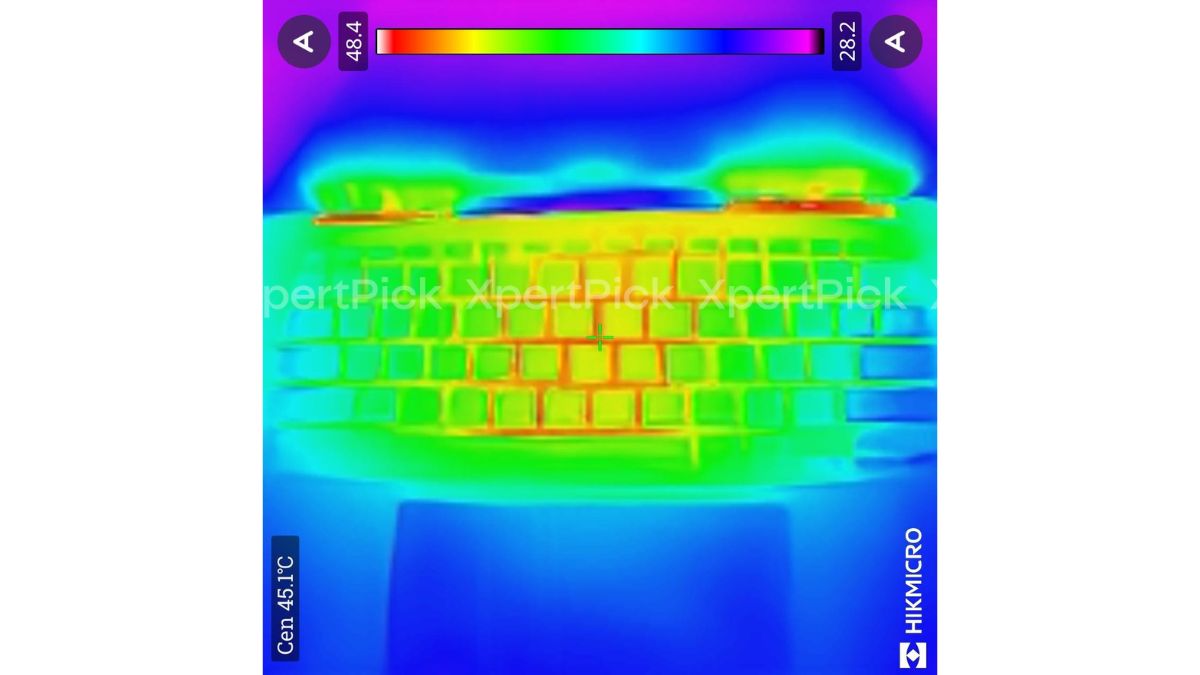
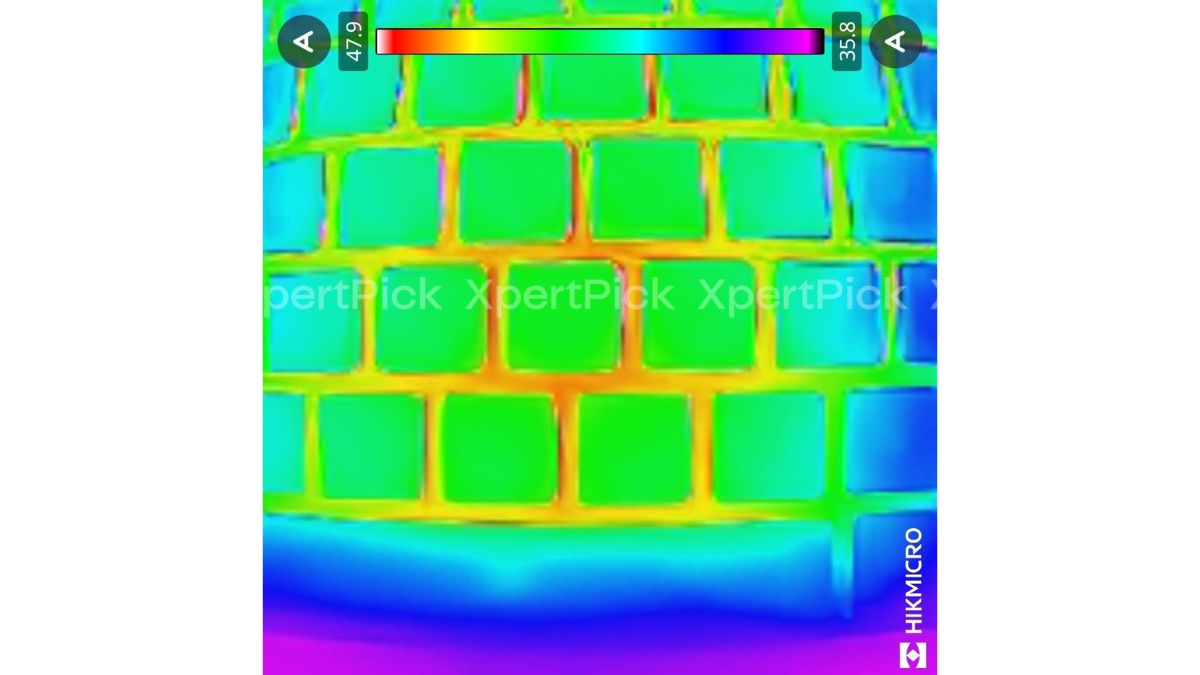
Examining the thermal telemetry and surface infrared imaging provides crucial context for the Samsung Galaxy Book6 Pro’s sustained performance behavior.
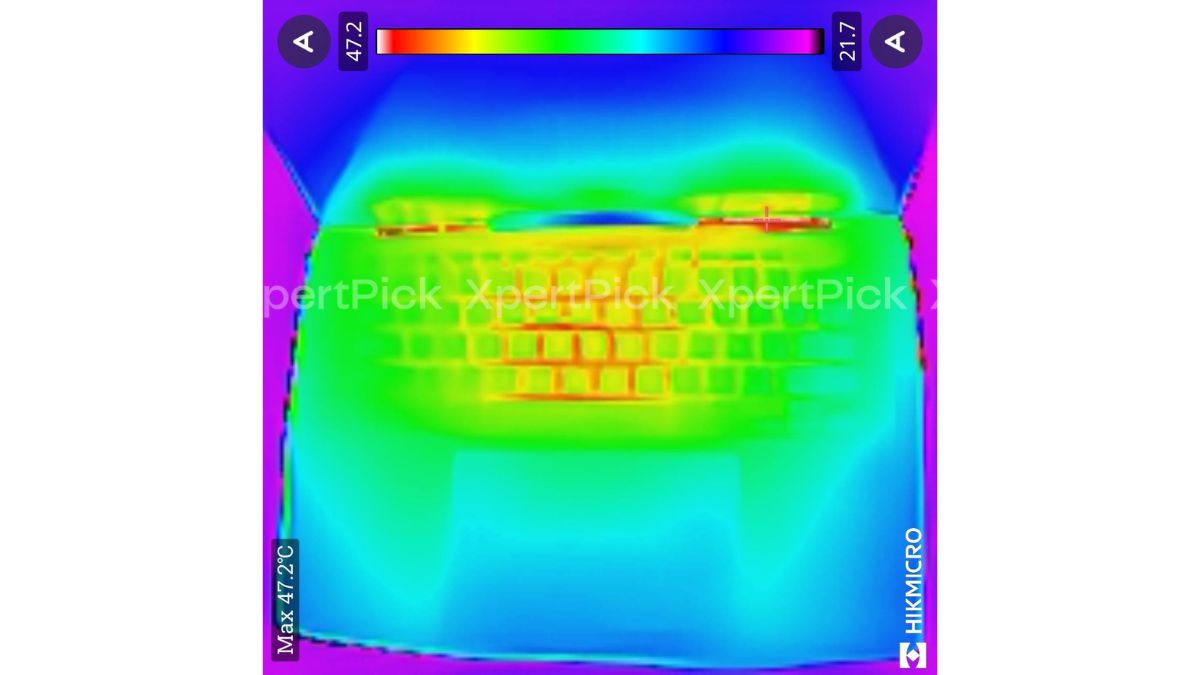
-
Sustained Internal CPU Temperature: ~64°C (during continuous graphics stress test)
-
Maximum Surface Temperature (Keyboard Center/Exhaust): 47.9°C to 48.4°C
-
Cool Zones: Palm rests and haptic touchpad area (21°C to 28°C)
The data reveals a highly conservative and user-comfort-focused thermal tuning profile by Samsung. The internal telemetry graph shows that after a very brief initial spike, the system aggressively clamps the Core Ultra X7 358H, flatlining the sustained internal temperature at a remarkably cool 64°C throughout a continuous graphics loop. This directly explains the 90.4% thermal stability score observed in earlier stress tests. The system deliberately limits power to prevent the silicon from running hot.
The infrared thermal imaging perfectly corroborates this strategy. Because the internal temperatures are kept strictly in check, chassis heat is highly manageable. The hottest surface points peak at roughly 48.4°C and are isolated to the top exhaust vents and the very center of the keyboard deck. Crucially, the thermal map shows the lower deck, where the palm rests and the haptic touchpad reside, remains entirely cool, hovering in the low-to-mid 20s.
Ultimately, while this aggressive thermal throttling leaves some of the Panther Lake chip’s raw performance on the table during extended sessions, it guarantees the laptop remains physically comfortable to use and relatively quiet under heavy load.
Shadow of the Tomb Raider: A Solid 60+ FPS Experience
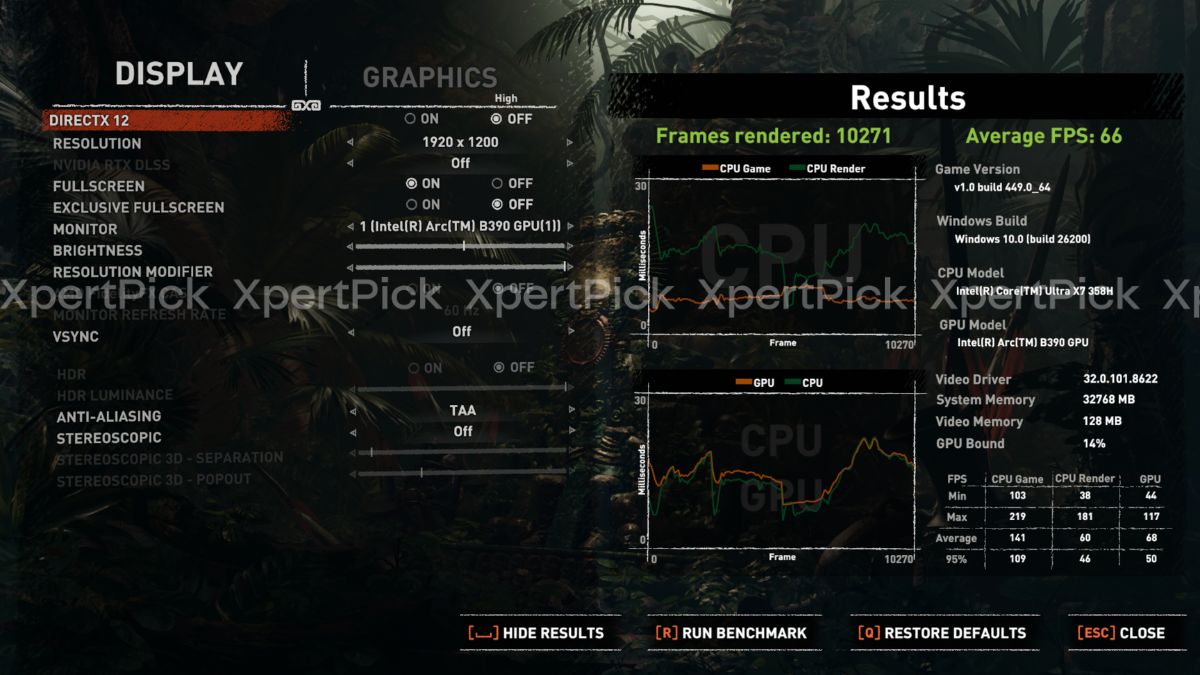
Testing the Intel Core Ultra X7 358H and its integrated Arc B390 GPU in Shadow of the Tomb Raider produced the following results at 1,920 x 1,200 resolution, using DirectX 12 and the High graphics preset:
- Average FPS: 66
- Minimum GPU FPS: 44
- 95th percentile GPU FPS / 5% lows: 50
The results show a narrow 16 FPS gap between the average frame rate and the 95th percentile figure, or 5% lows. This tight grouping points to consistent frame pacing with minimal micro-stutter. The system also manages to stay comfortably above 60 FPS on average at the native 1,200p High setting, while keeping the minimum frame rate well above 30 FPS even during more demanding rendering sequences.
Horizon Zero Dawn Remastered: Pushing the Limits at High Settings
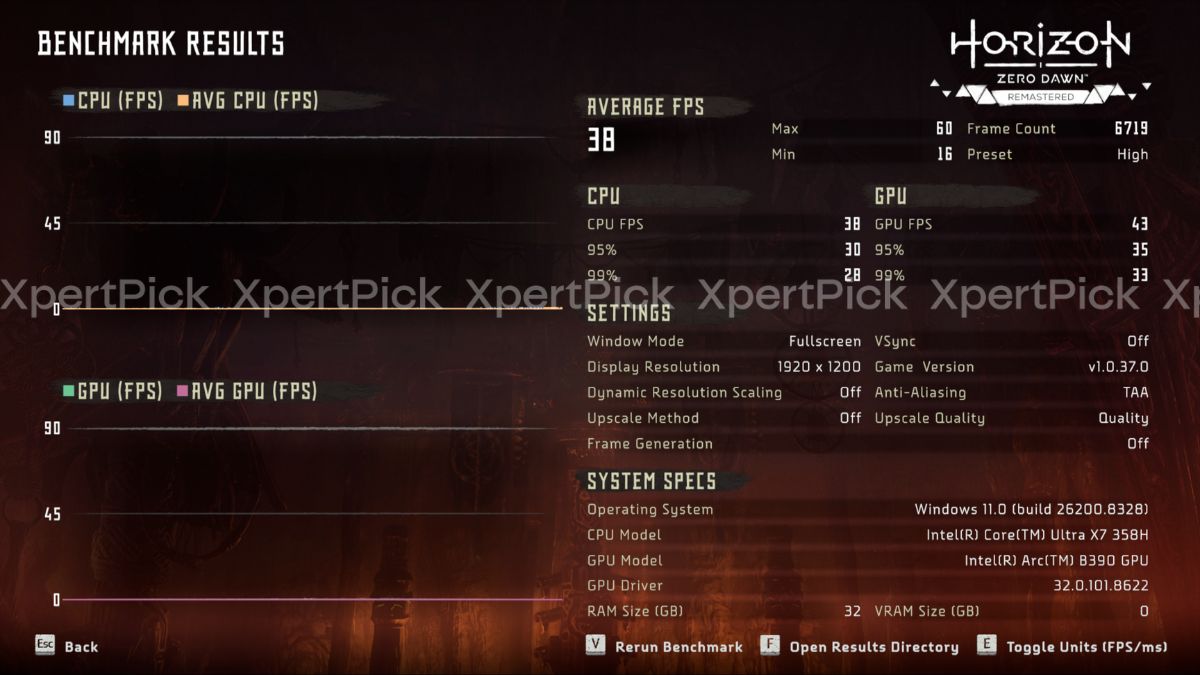
Testing the Intel Core Ultra X7 358H and its integrated Arc B390 GPU in Horizon Zero Dawn Remastered produced the following results at 1,920 x 1,200 resolution, using the High graphics preset with native rendering. Upscaling and frame generation were disabled.
-
Average FPS: 38
-
Minimum FPS: 16
-
Maximum FPS: 60
-
95th Percentile GPU FPS (5% Lows): 35
-
99th Percentile GPU FPS (1% Lows): 33
The FPS test shows a baseline average of 38 FPS, with an isolated and severe minimum drop to 16 FPS. However, the percentile figures point to strong moment-to-moment frame pacing. With the 95th percentile at 35 FPS and the 99th percentile at 33 FPS, the gap from the average remains fairly narrow.
This means that despite the recorded 16 FPS low, 99% of the rendering time is spent consistently above 33 FPS. Hitting a 60 FPS target would require lowering the graphics preset or enabling an upscaler such as Intel XeSS.
DOOM: The Dark Ages: 1080p Benchmark (Hebeth Map)
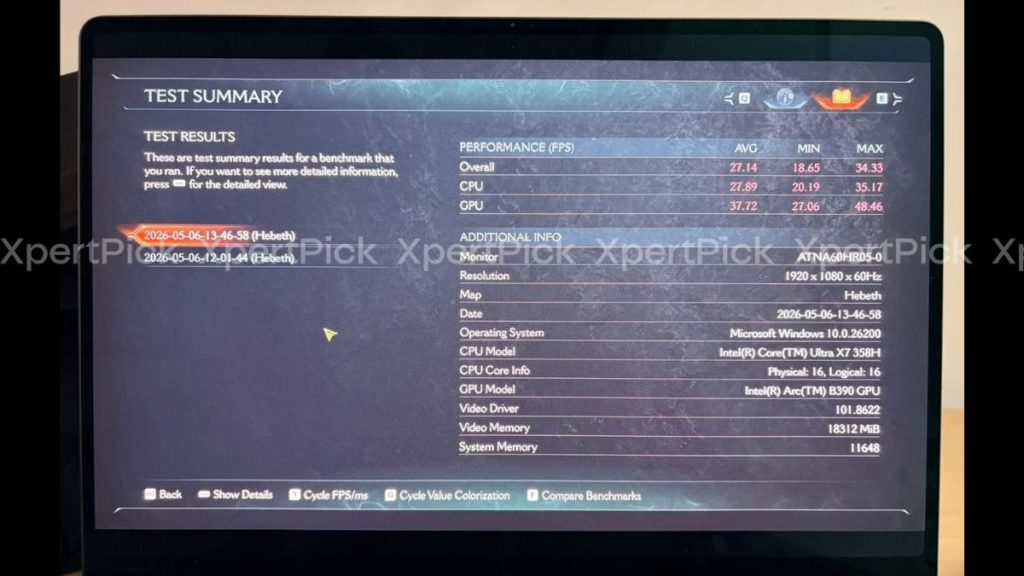
Testing the Intel Core Ultra X7 358H and its integrated Arc B390 GPU in the DOOM: The Dark Ages built-in benchmark, using the Hebeth map, produced the following results at 1,920 x 1,080 resolution:
-
Overall Average FPS: 27.14
-
Overall Minimum FPS: 18.65
-
Overall Maximum FPS: 34.33
-
CPU Average FPS: 27.89
-
GPU Average FPS: 37.72
The system appears to struggle to maintain a consistent 30 FPS floor at native 1080p in this demanding id Tech engine benchmark. A key detail here is the gap between the component averages: the GPU maintains a higher average of 37.72 FPS, while the CPU trails at 27.89 FPS, pulling the overall system average down to 27.14 FPS. This points to a CPU-bound bottleneck in this specific scenario.
The telemetry also shows aggressive video memory allocation of 18,312 MiB, confirming that the game is making heavy use of the laptop’s shared system RAM to cache its large textures and geometry data. To reach a playable 30 FPS or 60 FPS target in this title, you would need to use an upscaler such as Intel XeSS, or DLSS/FSR equivalents where supported.
Cyberpunk 2077: 1200p High Benchmark (with XeSS)
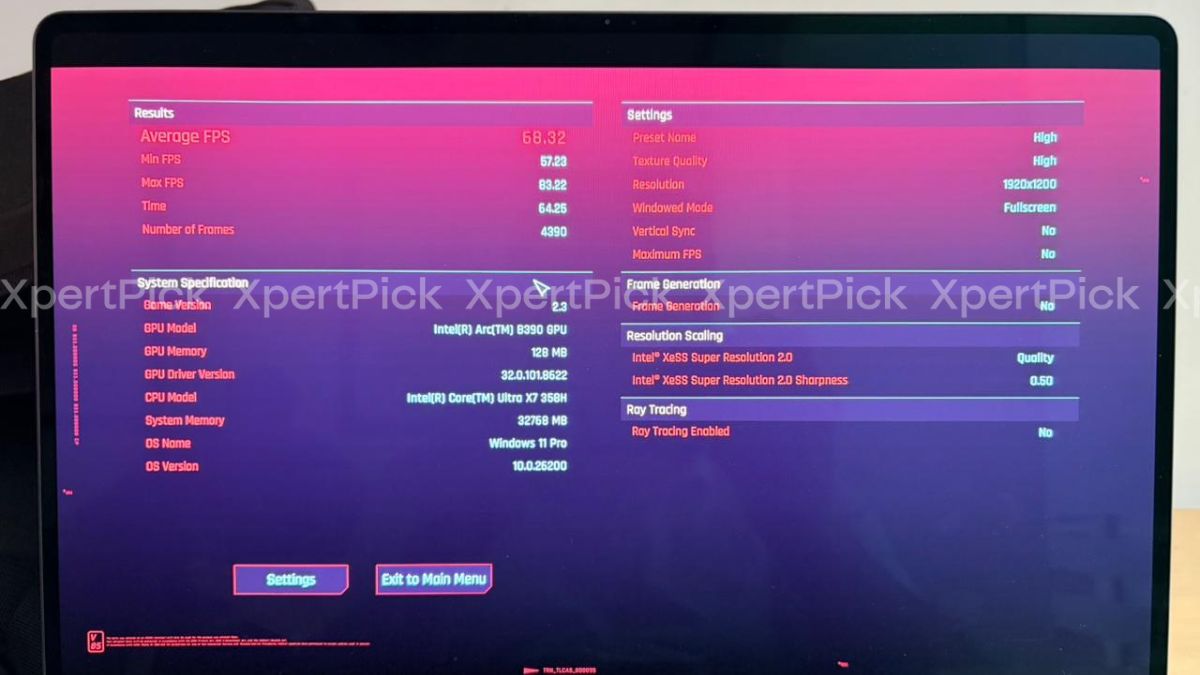
Testing the Intel Core Ultra X7 358H and its integrated Arc B390 GPU in Cyberpunk 2077 produced the following results at 1,920 x 1,200 resolution, using the High graphics preset with Intel XeSS Super Resolution 2.0 set to Quality mode. Ray tracing was disabled.
-
Average FPS: 68.32
-
Minimum FPS: 57.23
-
Maximum FPS: 83.22
What immediately stands out from these results is the effectiveness of Intel’s XeSS upscaling. With XeSS set to Quality mode alongside the High graphics preset, the Arc B390 integrated graphics comfortably pushes past the 60 FPS mark.
The tight gap between the 68.32 FPS average and the 57.23 FPS minimum is the real highlight here, as it points to a smooth and largely stutter-free experience without jarring frame drops. It also shows that while Panther Lake’s iGPU is capable in its own right, pairing it with modern upscaling technology makes demanding AAA open-world titles far more playable on a thin-and-light laptop.
Dirt 5: Benchmark Analysis
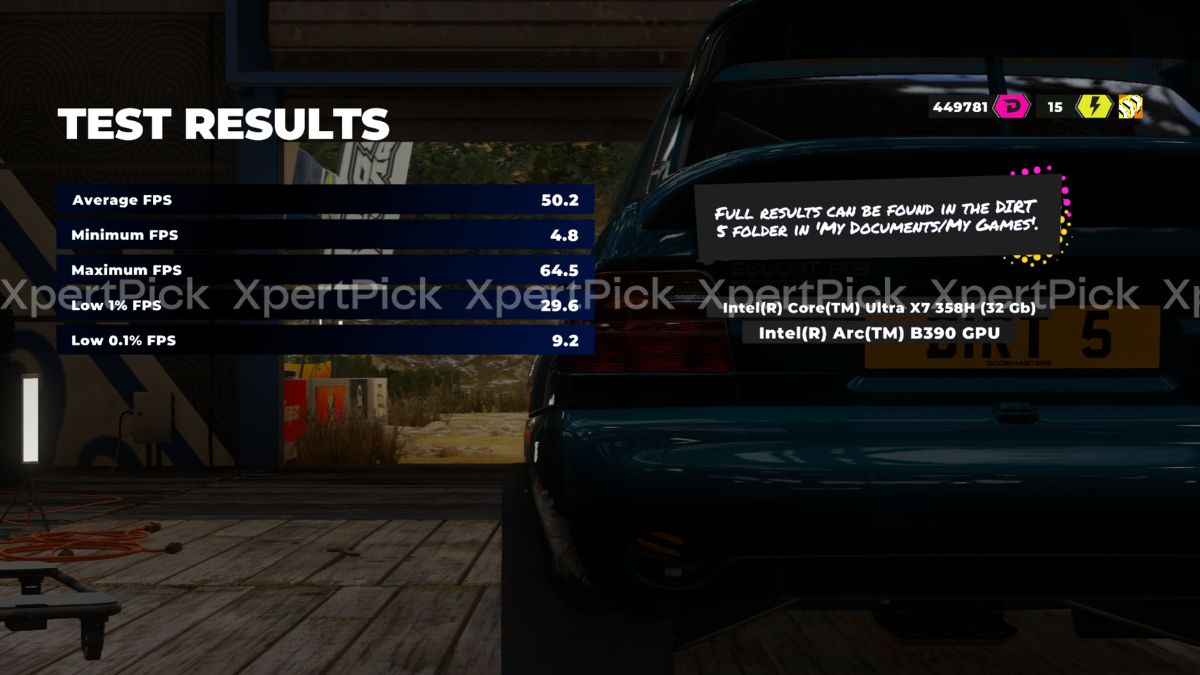
Shifting focus to high-speed rendering, the Dirt 5 benchmark exposes some frame pacing weaknesses on the Panther Lake iGPU, despite a solid overall average. Testing the Intel Core Ultra X7 358H and Arc B390 produced the following results:
-
Average FPS: 50.2
-
Maximum FPS: 64.5
-
Low 1% FPS: 29.6
-
Low 0.1% FPS: 9.2
-
Minimum FPS: 4.8
The 50.2 FPS average does not tell the full story of the gameplay experience. The more important figures here are the extreme drops: a 0.1% low of 9.2 FPS and an absolute minimum of just 4.8 FPS. In real-world terms, those numbers point to severe, noticeable stutters during races.
While the 1% lows just about hold the 30 FPS floor at 29.6 FPS, the sharp gap between the 50+ FPS average and the single-digit minimums suggests that the system struggles with sudden asset streaming or complex particle effects in this title. For a smoother experience, you would need to lower the graphics preset to stabilise frame pacing.
Metro Exodus: 1080p High Benchmark
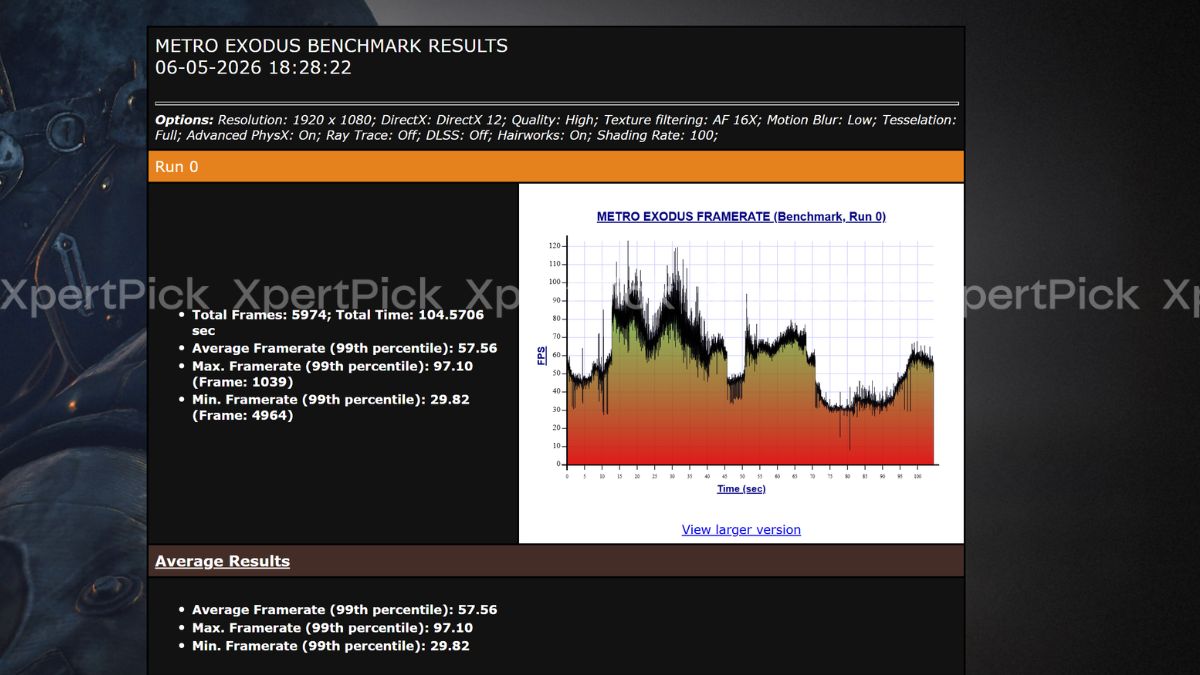
Evaluating the Panther Lake iGPU against demanding geometry and physics calculations, the Metro Exodus benchmark produced the following results at 1,920 x 1,080 resolution, using the High quality preset with HairWorks and Advanced PhysX enabled:
-
Average FPS (99th percentile): 57.56
-
Minimum FPS (99th percentile): 29.82
-
Maximum FPS (99th percentile): 97.10
The system falls just short of the 60 FPS target, delivering a highly respectable 57.56 FPS average in this notoriously demanding engine. The 99th percentile minimum drops to 29.82 FPS, which indicates that while baseline performance is strong, the heaviest rendering sequences push the frame rate right to the edge of the 30 FPS threshold.
Given that resource-intensive settings such as Advanced PhysX and HairWorks are enabled during this run, disabling these specific features should ease the bottleneck, raise the minimums, and help push the average comfortably above 60 FPS.
Gears 5: 1200p High Benchmark
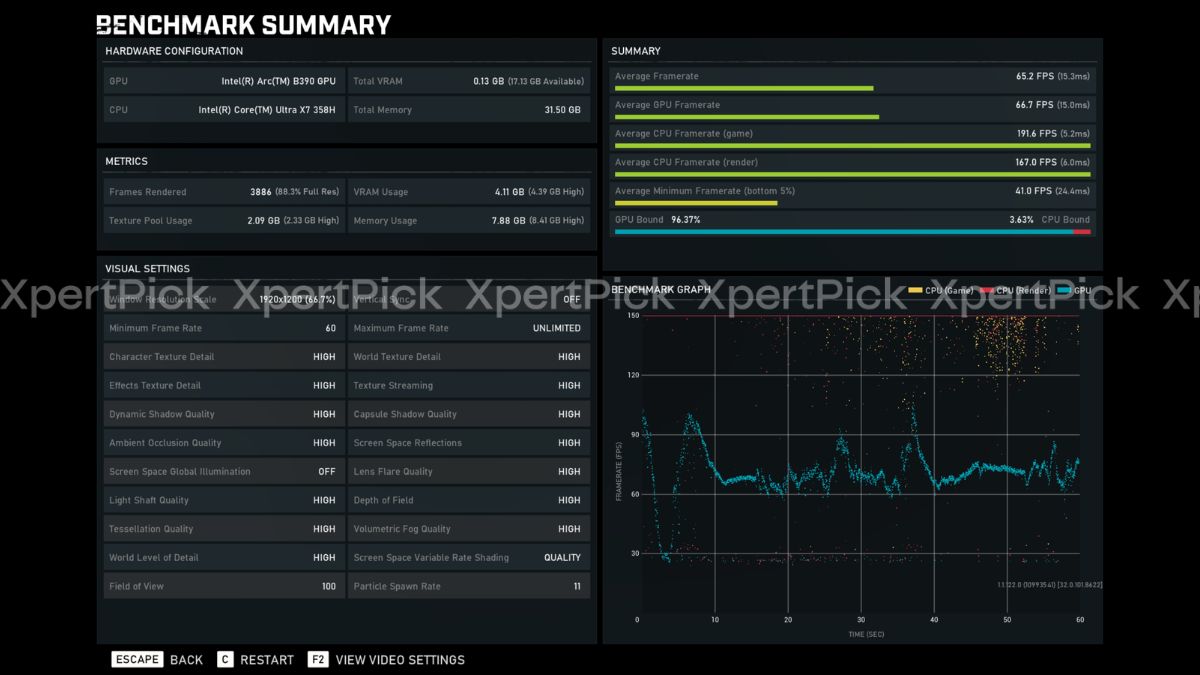
Assessing Unreal Engine 4 performance, the Gears 5 built-in benchmark gives us a clear look at how the integrated Arc B390 handles sustained, heavy action sequences at 1,920 x 1,200 resolution with mostly High graphics settings.
-
Average FPS: 65.2
-
Average Minimum FPS (Bottom 5%): 41.0
-
Average CPU Framerate (Game): 191.6
-
GPU Bound: 96.37%
The telemetry shows a highly stable 65.2 FPS average, comfortably clearing the 60 FPS target at native 1,200p. Crucially, the system remains overwhelmingly GPU-bound at 96.37%, while the CPU-side game frame rates push well beyond 190 FPS. That indicates there is no meaningful processor bottleneck from the Core Ultra X7 358H in this scenario.
The bottom 5% figure sits at a solid 41.0 FPS, meaning that even during the most demanding, particle-heavy sequences, frame pacing remains controlled and does not dip into unplayable territory. This points to strong driver optimisation for older, well-established AAA engines.
Borderlands 3: 1200p Benchmark
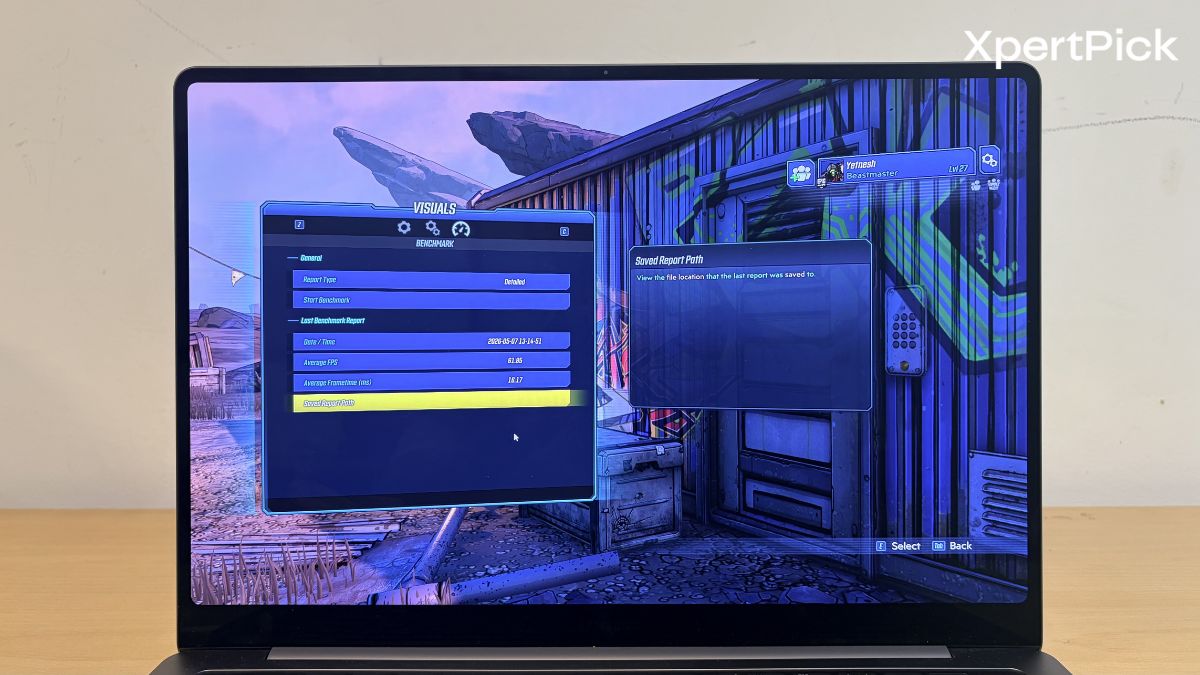
Rounding out our testing suite with a fast-paced, cell-shaded shooter, the Borderlands 3 built-in benchmark highlights solid baseline performance from the Arc B390 architecture. Testing at 1920 x 1200 resolution yields the following metrics.
-
Average FPS: 61.86
-
Average Frame Time: 16.17 ms
Stepping into slightly older rendering engines, the Panther Lake iGPU comfortably clears the 60 FPS hurdle without breaking a sweat. The 61.86 FPS average paired with a tight 16.17-millisecond average frame time translates to highly responsive gunplay and fluid movement across the map. This result indicates that for well-established, legacy titles, the Intel Core Ultra X7 358H provides more than enough raw graphical horsepower to deliver a smooth, native-resolution experience without needing to rely on upscaling technologies.
Final Verdict: Gaming on the Intel Core Ultra X7 358H
Looking at the aggregate data, the Intel Core Ultra X7 358H and its integrated Arc B390 graphics redefine the baseline expectations for thin-and-light ultrabooks. The telemetry proves that this silicon is highly capable, consistently pushing past the 60 FPS mark at 1200p in well-optimized and legacy AAA titles like Shadow of the Tomb Raider, Gears 5, and Borderlands 3 strictly through raw native rendering. Furthermore, when tackling incredibly heavy workloads like Cyberpunk 2077, Intel’s XeSS upscaling smoothly bridges the performance gap to maintain absolute fluidity.
While the iGPU predictably encounters limits in ultra-demanding, memory-heavy engines like DOOM: The Dark Ages and Horizon Zero Dawn Remastered at native settings, the overall performance envelope is remarkable for a chassis this thin. It confirms that the Samsung Galaxy Book6 Pro successfully balances aggressive thermal management and high-end productivity features, like the haptic touchpad, with genuine after-hours gaming capability.
| Game | Resolution & Key Settings | Average FPS |
| Cyberpunk 2077 | 1200p, High (XeSS Quality) | 68.32 |
| Shadow of the Tomb Raider | 1200p, High | 66.00 |
| Gears 5 | 1200p, High | 65.20 |
| Borderlands 3 | 1200p, Benchmark Preset | 61.86 |
| Metro Exodus | 1080p, High (PhysX & HairWorks On) | 57.56 |
| Dirt 5 | Benchmark Settings | 50.20 |
| Horizon Zero Dawn Remastered | 1200p, High (Native) | 38.00 |
| DOOM: The Dark Ages | 1080p (Hebeth Map) | 27.14 |